Audio (343) Audio (343)
Datatype (51)
Demo (203)
Development (600)
Document (22)
Driver (97)
Emulation (148)
Game (1005)
Graphics (499)
Library (116)
Network (233)
Office (66)
Utility (928)
Video (69)
Total files: 4380
Full index file
Recent index file
Amigans.net
OpenAmiga
Aminet
IntuitionBase
|
Commander | | Description: | A multi-purpose blanker module | | Download: | commander.lha (TIPS: Use the right click menu if your browser takes you back here all the time) | | Size: | 74kb | | Version: | 2.3 | | Date: | 25 Sep 2013 | | Author: | Alex Carmona | | Submitter: | Alex Carmona | | Email: | AmigaOne/theworld net | | Homepage: | http://AM1GA.com | | Category: | graphics/screenblanker | | Replaces: | graphics/screenblanker/commander.lha | | License: | Freeware | | Distribute: | yes | | Min OS Version: | 4.0 | | FileID: | 8299 | | | | | | Comments: | 4 | | Snapshots: | 4 | | Videos: | 0 | | Downloads: | 431 (Current version) | | 1201 (Accumulated) | | Votes: | 0 (0/0) (30 days/7 days) | |
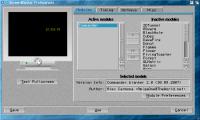
      Commander is a multi-purpose ScreenBlanker module.
It features...
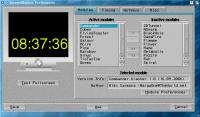
- Clock with standard and internet time
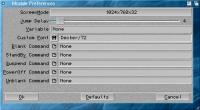
- ScreenMode selection
- Display update delay setting
- Clock/Variable text with color cycling
- User-defined font
- User-defined variable display
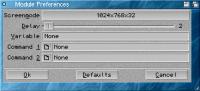
- User-defined command to launch when blanking
- User-defined command to launch on DPMS Stand-by
- User-defined command to launch on DPMS Suspend
- User-defined command to launch on DPMS Power off
- User-defined command to launch when unblanking
What all this means is that whatever you want your screenblanker to do, like
displaying a picture, slideshow, cartoon, crunching number or anything, you
can make it happen with Commander, "the mother of all blankers" :-)
===============================================================================
HISTORY:
v1.0 (16.09.2006)
- First public release
v1.1 .. 1.5
- Fixed DPMS bug
- Various changes, not good enough for release
v2.0 (30.09.2007)
- Added a command for each DPMS timer event
- Added possibility to define custom font and size
- Added yellow alerts for failures with fallback fonts
- Made preview font proportional whenever possible
- Changed conflicting shortcuts in settings window
- Time format now follows Locale/Country prefs setting
v2.1 (04.03.2008)
- Added Clock setting to disable opening the clock screen so that Paul E.
Bloedel's BubbleBlanker can appear on the Workbench
- Skips clock-related code when Clock is off keeping overhead to a minimum
- ScreenMode, Delay, Variable and Font gadgets in the preferences window are
disabled when Clock is set to None
v2.2 (07.22.2010)
- This release only fixes cosmetic issues which annoyed me, no new features
- The custom screen is now opened/closed behind the Workbench to prevent
flashing the screen with the color defined for from pen 0 in the palette
- Wrote a new color table generation routine. Now the color cycle loops around
smoothly, it was jumping straight from blue to red
- Randomized start color so that the text color won't always start from red
- Removed extraneous redrawing of the clock
v2.3 (11.02.2013)
- Added missing Alpha channel value in color table
- Minor code optimizations
===============================================================================
THANKS:
Thanks to all the people on the AmigaWorld and Beta IRC channels who helped me
with my programming questions or tested the blanker, causing me to improve it
more than I had originally planned.
===============================================================================
Enjoy!
--
Amiga... Duh!
|