 | Logo by DaveyD (anonymous IP: 216.73.216.46,2532) | |||||||||||||
| ||||||||||||||
 Audio (354) Datatype (52) Demo (214) Development (632) Document (24) Driver (105) Emulation (158) Game (1070) Graphics (519) Library (124) Network (250) Office (75) Utility (962) Video (75) Total files: 4614 Full index file Recent index file
Amigans.net Aminet IntuitionBase Hyperion Entertainment A-Eon Amiga Future
Support the site
|
      webkitty for AmigaOS 4
======================
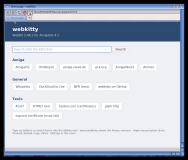
webkitty is a web browser for AmigaOS 4.1 based on WebKit 2.48.3, the
engine behind Safari. It shows current web pages with HTML5, CSS3 and
JavaScript, including secure https sites, in a native ReAction window.
This AmigaOS 4.1 PPC port by Falke_34 is based on the webkitty sources
by Jacek Piszczek (the WebKit engine of the MorphOS browser Wayfarer),
together with the AmigaOS 4 parts of Odyssey 4.1 and of the earlier,
unfinished webkitty port by AmigaLabs. Falke_34 made it build and run
on AmigaOS 4.1 and added the user interface.
Features
--------
* WebKit 2.48.3 with JavaScriptCore (JavaScript), http and https
* Tabs: open, close (close button on the tab), switch, "+" tab for a
new one; links that ask for a new window open in a new tab, a middle
click on a link as well
* Address bar with search: anything that is not an address is searched
with DuckDuckGo (search engine can be changed, Aminet and OS4Depot
are among the choices)
* Toolbar with Back, Forward, Reload, Stop and Home (images from
TBImages:, text buttons if they are not installed)
* Status line with the link under the mouse, loading progress and
running downloads
* Downloads with "Save as" requester and a downloads window (progress,
cancel, clean up)
* History window with search, open, open in new tab and delete
* Bookmarks: "Add Bookmark" (Amiga+B) in the "Bookmarks" menu, the
bookmarks themselves directly in that menu, and a bookmarks window
with search, open, open in new tab, change title and address, move
up and down, delete and import. They are stored in the usual
bookmarks file format of web browsers, so bookmarks exported from
Firefox or Odyssey can be imported (folders are flattened), and
Bookmarks.html can be imported in other browsers. On the first start
webkitty sets up a collection of Amiga sites (OS4Depot, Aminet,
AmigaOS, Hyperion, amigans.net, AmigaWorld.net, amiga-news.de,
OS4Welt, A1K.org, Amiga Future, English Amiga Board and more)
* Pages in background tabs (and while the window is iconified) use
less processor time and memory: their timers are slowed down,
animations stop, and after 30 seconds they are paused completely
until they are shown again (pages that are loading or playing sound
stay active)
* When memory runs low, webkitty empties its caches
* Context menus for pages, links and images (open, copy address, save)
* Drop-down lists, JavaScript dialogs, file upload, login dialog for
protected sites, tooltips
* Form fields for date, time, month, week and date with time (typed
directly into the field), colour fields with a colour requester
(sliders for red, green and blue or #rrggbb), suggestion lists of
text fields (datalist; click the arrow or into the field)
* Images: JPEG, PNG, GIF, WebP, JPEG 2000, BMP, ICO, SVG
* Local Storage for web applications (kept in the Cache drawer)
* Ad blocker with the EasyList filter list
* Settings window (see below)
* Iconify gadget, menu with keyboard shortcuts
* about:webkitty shows the versions of all libraries used, queried
while the program runs
* English user interface
Requirements
------------
* AmigaOS 4.1 Final Edition
* clib4.library 2.5 or newer in LIBS:
* A TCP/IP stack (Roadshow) for internet access
* Plenty of free memory; large sites need several hundred megabytes
* Optional: TBImages: for the toolbar images
Installation
------------
Copy the drawer "webkitty" anywhere, for example to "Work:Internet".
Keep the contents of the drawer together:
webkitty the browser
fonts.conf font configuration
Resources/ start page, certificates (curl-ca-bundle.crt),
ad filter list (easylist.txt), style sheet,
default bookmarks (Bookmarks.html)
Downloads/ default folder for downloads
Tmp/ temporary files
webkitty creates these files and drawers itself:
Cache/ cookies, the disk cache and Local Storage
History.txt the history
Bookmarks.html the bookmarks (on the first start a copy of
Resources/Bookmarks.html)
webkitty.log messages of the browser and of WebKit
Resources/easylist.dat prepared ad filter list
Start webkitty from the Shell with "webkitty" or "webkitty <address>".
The first start takes noticeably longer: the ad filter list is read and
stored as easylist.dat. Later starts use this file and are fast.
Settings
--------
"Settings..." in the "Settings" menu. "Use" applies the settings,
"Save" also keeps them after a reboot (ENV:webkitty.prefs and
ENVARC:webkitty.prefs).
General Home page (webkitty start page or your own address),
search engine (a choice of well-known engines or your own
address, %s stands for the search terms), download folder,
ask where to save each download
Content JavaScript on/off, load images on/off, block ads on/off,
user agent (Safari, webkitty, Chrome, Firefox or your own)
Privacy Cookies: accept all, block third-party cookies or block all;
"Delete cookies" and "Clear cache" act at once
Network Proxy (for example http://host:8080 or socks5://host:1080)
and hosts that are reached without proxy
Log Write all messages to PROGDIR:webkitty.log
JavaScript and images apply to pages loaded afterwards; use Reload for
a page that is already open.
Known limitations
-----------------
* JavaScript runs without a JIT compiler, so script-heavy sites are
slow
* No audio and video playback
* Very large sites need a lot of memory and time
Changelog
---------
1.0 (first AmigaOS 4 release)
- WebKit 2.48.3 browser with ReAction user interface
- Tabs, history, bookmarks (with a collection of Amiga sites),
downloads, context menus, settings window
- Choice of search engine and home page
- WebP images, Local Storage, date/time and colour fields, datalist
- Background tabs are slowed down and paused, caches are emptied when
memory runs low
- Ad blocker (EasyList), user agent, cookie and proxy settings
- Log file, about:webkitty
Credits
-------
WebKit Apple and the WebKit contributors
MorphOS port of WebKit Jacek Piszczek and the MorphOS team
(webkitty, github.com/jacadcaps)
AmigaOS 4 parts Odyssey 4.1 and webkitty 2.36 by
AmigaLabs
AmigaOS 4 port, user interface Falke_34
Libraries cairo, pixman, FreeType, HarfBuzz,
fontconfig, ICU, libcurl, OpenSSL,
SQLite, libpng, libjpeg-turbo, libwebp,
Brotli, WOFF2, zlib and their authors
Ad filter list EasyList authors (easylist.to)
Certificates Mozilla, via curl.se
Legal
-----
WebKit is free software under the GNU Lesser General Public License
version 2 and the BSD license; the parts of the libraries keep their own
licenses. EasyList is dual licensed under GPL version 3 and CC BY-SA 3.0.
webkitty source: https://github.com/jacadcaps/webkitty
WebKit: https://webkit.org
| ||||||||||||||||||||||||||||||||||||||||||||||||||||||||||||||||||

| Copyright © 2004-2026 by Björn Hagström All Rights Reserved |